
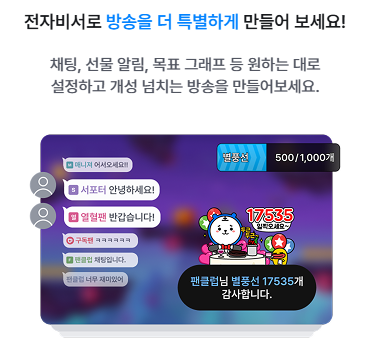
The Assistant is a feature that displays chat, alerts, and goal graphs on the broadcast screen, and can also read them aloud using voice.
You can check detailed usage instructions through the Assistant guide below.
It can be added as a source in FreecShot and used conveniently without copying a separate URL.
Detailed settings can be configured on a separate web page, and once saved, they will be applied to the broadcast.
For XSplit and OBS, you can also use it by copying and adding the provided URL.
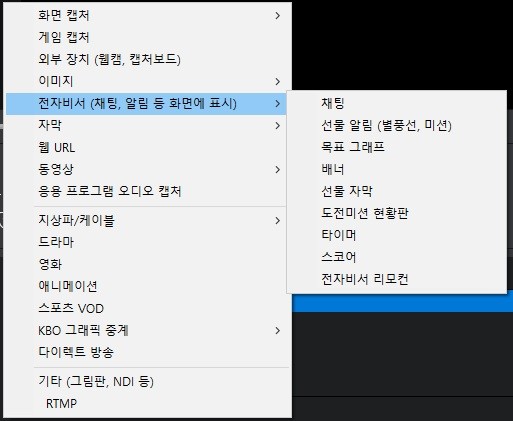
- Chat
- Displays chat messages from the chat window on the broadcast screen.
- You can customize alignment, visibility of user levels and icons, as well as chat font and color.
- Gift Alerts / Voice Notifications
- When users send UPs (likes), Star Balloons, subscriptions, Ad Balloons, or stickers, alerts are displayed on the broadcast screen.
- When a message is entered after sending gifts like Star Balloons or Ad Balloons, the message is read aloud.
- Default alert messages (e.g., “Thank you for X Star Balloons, [nickname]”) are also read aloud.
- You can choose between default alert images or upload your own custom images.
[How to Set Alert Sounds – Streamer]
- FreecShot: Scene Management > “+ Add” > Assistant > Select Alerts
- External Device (OBS, etc.): Additional Features > Assistant Settings > Alerts > Copy the URL at the bottom and add it as a browser source in your streaming software
- Mobile: Source List > Select Assistant Alerts
[How to Set Alert Sounds – User]
Select a message and voice option when sending Star Balloons
*Messages may not be played depending on the streamer’s Assistant settings.
*Certain voice alerts (e.g., specific streamer voices) are only available within those streamers’ broadcasts.
- Goal Graph
Displays Star Balloons, UPs, or participant count as a graph based on defined start and target values.
- Banner
Provides a rolling banner feature to display multiple images.
Includes transition effects to enhance visibility when switching images.
- Gift Subtitle
Displays the user who sent a gift and the number of Star Balloons as subtitles on the screen.
- Challenge Mission Board
Displays the challenge mission status board on the broadcast screen.
- Timer
Displays a timer, stopwatch, or current broadcast time on the screen.
- Score
Displays scores on the broadcast screen.
- Assistant Remote Control
Allows you to manage all Assistant features in one place, including ON/OFF toggles, alert sound settings, and minimum Star Balloon thresholds for alerts.