
You can create AI videos using text through SAVYG.
[Text-to-Video]
STEP 1 Describe the subject of the uploaded image in as much detail as possible.
ex) A Japanese female character with long black hair wearing a red knit sweater
STEP 2 Describe the subject’s actions in detail.
ex) Making a heart shape above her head and smiling sweetly
STEP 3 Use sequence words such as “First,” “Then,” and “Finally” at the beginning of each sentence to indicate order
STEP 4 Click “Create AI Video” at the bottom to complete the process.
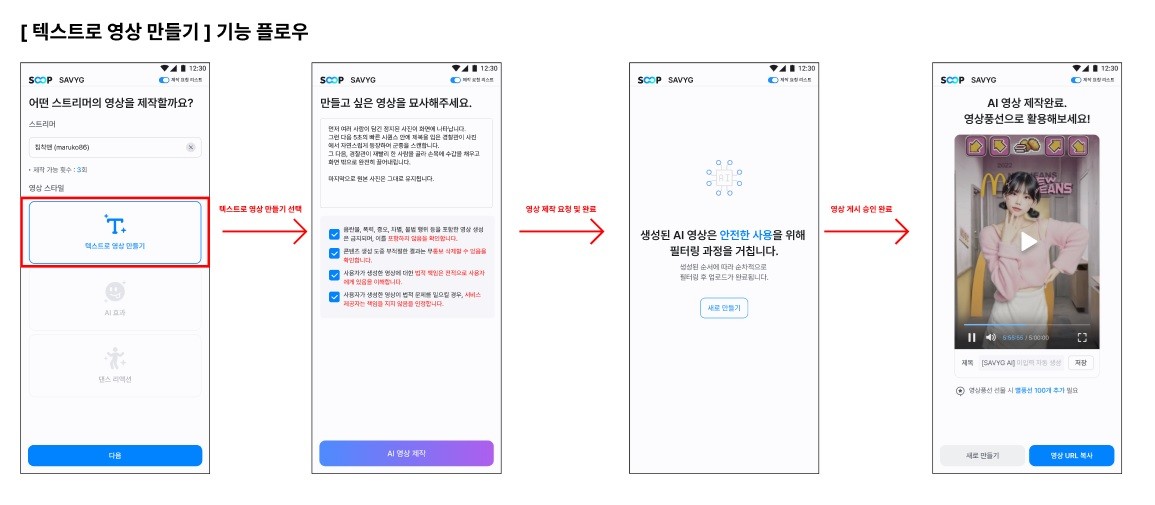
For safe use of AI-generated videos, “Text-to-Video” content is posted to your channel only after passing internal filtering.
Videos are usually published within 1 hour, but if there are many requests, processing may take longer as they are handled sequentially.
Even if you close the popup, the creation will continue. If you have requested multiple videos, you can check their status in the [Creation List].
However, if you create a video using FreeShot or FreeShot Plus, the creation will stop when the popup is closed, so please be aware.
Additionally, automatic filtering is applied during the prompt input stage.
Some words may be interpreted differently depending on the context and could be recognized as inappropriate regardless of your intent.
In such cases, please try rephrasing the sentence or replacing certain words.
Even with the same meaning, changing the expression may allow the video to be generated successfully.