
Clear Mode is a feature in the PC LIVE and VOD player that adjusts the colors displayed in the video area to arbitrary values, allowing for a sharper viewing experience compared to the original quality.
It is especially effective for content that requires high visual quality, such as game streams, though the experience may vary depending on the streamer’s broadcast settings and lighting.
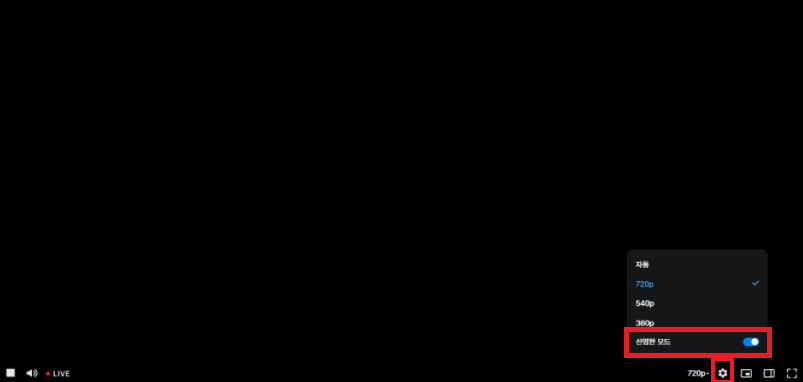
[How to Enable]
Path: PC LIVE, VOD Quality Settings > Clear Mode ON
- Not available on PC Safari, Firefox browsers, or mobile devices.
[If you experience issues with participating in the stream]
Change your browser settings to enable hardware acceleration.
- Chrome: Settings > System > Use hardware acceleration when available
- Whale: Settings > Performance and 기타 > Use hardware acceleration when available
- Edge: Settings > System and Performance > Use hardware acceleration when available
[If flickering occurs]
- Enter chrome://flags in the Chrome browser to access settings
- Find the “Choose ANGLE graphics backend” option and set it to Default
