Buffering refers to the process of preloading parts of a video onto the user’s device to ensure smooth playback without interruptions.
- Initial buffering: The first preparation process after entering a broadcast to start playback
- Mid-stream buffering: Occurs during viewing due to temporary issues with the user’s device or internet connection
※ There are typically three main reasons for buffering during playback:
- Slow upload speed from the streamer
For example, if the streamer’s upload speed is 400k but they stream at 800k quality, viewers may experience buffering.
In this case, the streamer needs to adjust their broadcast settings according to their internet environment. This issue cannot be resolved by users or SOOP. - Slow internet speed on the user’s side
For example, if your download speed is 400k but you try to watch an 800k stream, buffering may occur because the video cannot be loaded in real time.
In this case, please check your internet connection or select a stream quality that matches your network speed. - Running multiple programs or having malware/viruses on your PC
Buffering may occur if you are downloading files or running high-performance programs (e.g., games) while watching.
Since SOOP operates in real time, using P2P or other network-intensive programs simultaneously may cause buffering.
Please close unnecessary programs before using the service.
※ How to check your internet speed
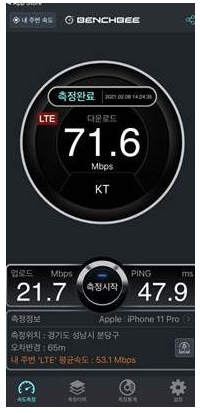
You can check your internet speed using a separate app such as Benchbee.
Compare your speed with the average shown (e.g., “Nearby LTE average speed: 53.1 Mbps”).
If your speed is lower than the average, there may be an issue with your network, and further inspection is recommended.