

Hello, this is SOOP.
As part of the SOOP One-Build initiative for global service, the SOOP domain will be changed along with improvements to the notification system so that you can enjoy content more conveniently.
Meet streamers from around the world on SOOP and enjoy fun and exciting moments with other users in real time.
Please refer to the details below.
■ Schedule
- March 24, 2026 (Tue)
■ Details
1. Domain Change
- www.sooplive.co.kr → www.sooplive.com
Q. Why is the domain changing to .com?
A. To support expansion across countries and languages, improve global content accessibility, and ensure stable service operations, the existing country-based domain has been changed to a global domain.
Q. What will happen to the existing .co.kr address?
A. If you access the service using the existing address, you will be automatically redirected to .com.
The service will still be available, however, the .co.kr domain will be discontinued in the future, so please use the new address.
Q. Will there be any changes to the service due to the domain change?
A. This change only affects the domain structure for global integration, and you can continue using the service as before.
2. Notification System Renewal
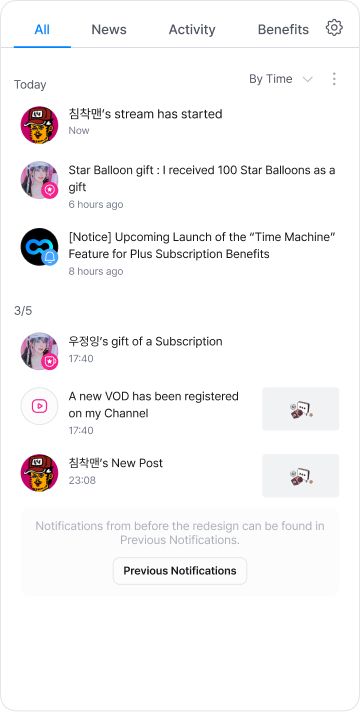
(1) Notification Category Classification
- Received notifications will now be automatically categorized. Instead of searching through accumulated notifications,
you can easily and quickly find the information you want by News, Benefits, and Activities.
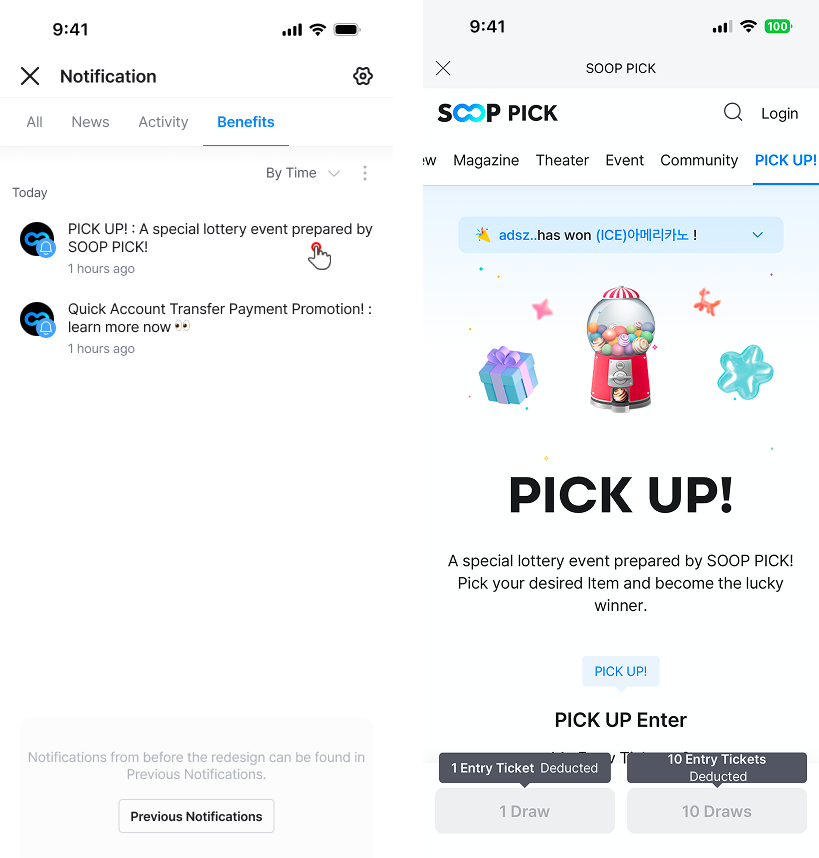
(2) Don’t Miss Important SOOP Updates — Now Available via PUSH
- You can now receive ongoing event information and various SOOP updates through PUSH notifications
(3) Desktop Notification Removal
- In response to changes in browser policies and to provide a more stable viewing environment,
the desktop notification feature will be discontinued. Please receive updates through app push notifications instead.
(4) Do Not Disturb Time Settings
- Since this feature overlaps with the “Do Not Disturb” function provided by mobile devices,
it has been removed. Please use the Do Not Disturb mode available on your mobile device instead.
Q. I want to receive event information via PUSH notifications.
A. Please make sure to check the following two settings:
1. Marketing Consent: In the [My Information] menu,
change 'Consent to Receive Marketing Communications' to [ON]. [Shortcut] https://member.sooplive.co.kr/app/user_info.php
2. App Notification Permission: Check that 'Push Notification Settings' is enabled in your smartphone settings or in the app [Settings] menu.
Q. Where can I check notifications received before the renewal?
A. Existing notifications will be stored for 14 days from the date received.
- Click the [Previous Notifications] button at the bottom of the new notification list to view notifications you previously received.
- Please note that notifications older than 14 days will be deleted sequentially and may no longer be available.
We will continue striving to provide better services through ongoing updates.
Thank you for your continued interest and support.
Regards,
SOOP Support